 mobiCut
Docs › Get started
What mobiCut is
mobiCut is planned to be released on Google Play in mid-November 2026.
A small video editor for Android, made for quick edits of action clips right on the phone.
Coming to Google Play See what it can do Free & Pro
What mobiCut is for
You come down from a paragliding flight or a ski run with a long video. Most of it is waiting, walking or drifting; a few moments are the ones you want to share. mobiCut lets you turn that raw clip into a short video before you even get home:
- cut it into segments and throw away the boring parts,
- speed up the long stretches (up to 16×) or slow down the best moment (down to 0.25×),
- add texts to say where and what it is, and title cards between the parts,
- join the parts with fades so the cuts look intentional,
- put in photos with a slow zoom or slide, and music under it all,
- make a slideshow from up to 50 photos in one go, at the length and size you choose,
- mute the wind noise, and join several videos into one,
- put arrows, smileys and shapes on the video and make them follow a glider or skier,
- export a new video to your gallery, ready to share.
Your video stays where it is
mobiCut never copies, downloads or uploads your source video. It only links to it. A project is just your list of edits (a few kilobytes) pointing at the original file in your gallery, on the SD card or on the camera. The original is never changed, and starting a project from a 4 GB clip takes no extra space and no waiting.
- Nothing leaves your phone. mobiCut has no internet access at all: no account, no cloud, no upload. Everything happens on the device.
- No duplicates eating your storage. The only new file is the finished video you export.
- If you move or delete the original, the project asks you to point it at the video again.
Very fast exports
Exports are very fast. mobiCut renders the finished video right on the phone, using its built-in video hardware, so there's nothing to upload and no server queue to wait for.
- The parts you deleted are skipped, so a short edit of a long flight exports quickly.
- Choosing a smaller resolution (720p) or 30 fps makes it faster still, and the file smaller.
- The result lands straight in your gallery, ready to share.
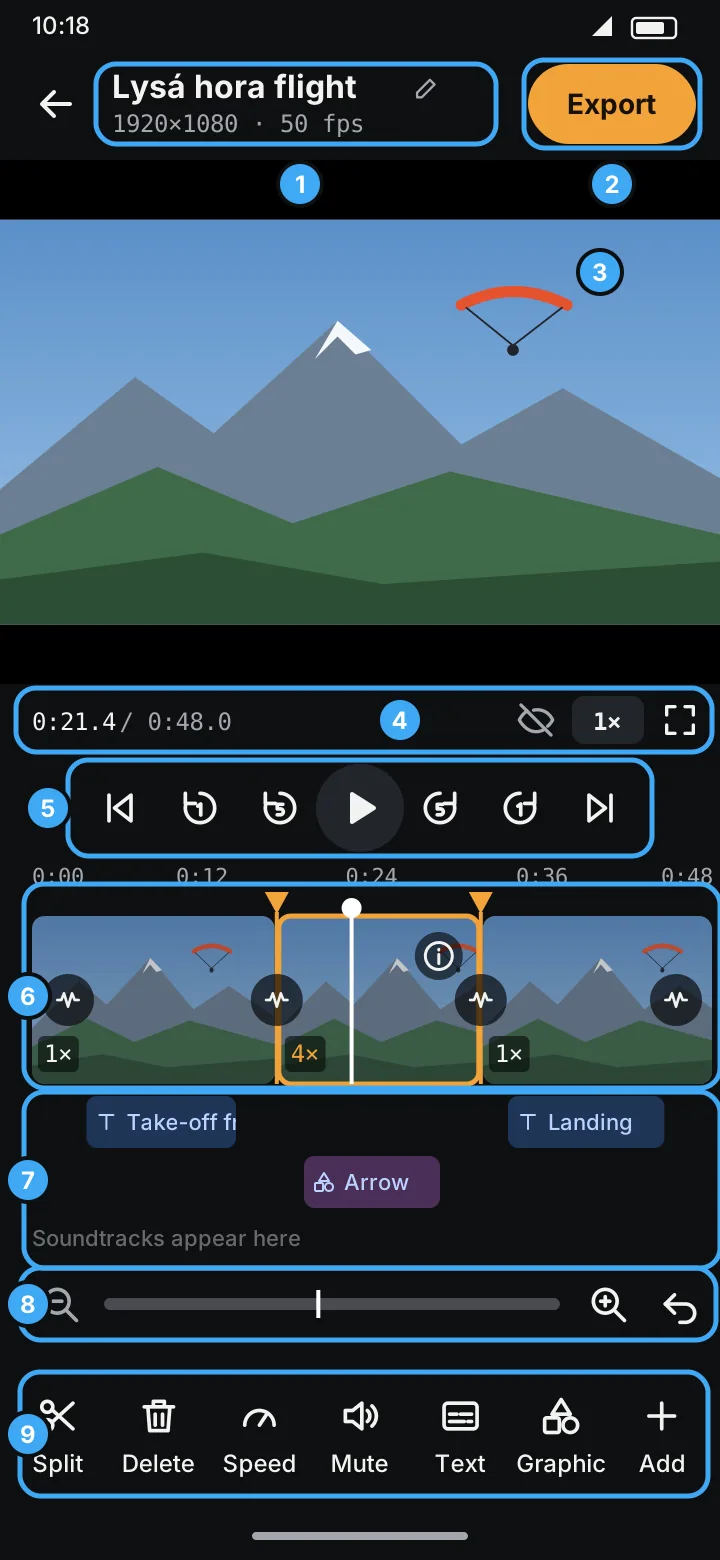
How it works, in one minute
- Start a project from a video in your gallery or on an SD card or USB camera.
- The whole video is one segment on the timeline. Split it where something changes.
- Give each segment what it needs: delete it, change its speed, add a text over it.
- Export. The new video lands in
Movies/MobiCutin your gallery.
Your edits save automatically, so you can close the app and come back to a project any time.
Editions
mobiCut comes in two editions: Free and Pro.
Free will always be free, and always free of ads. No ads in either edition, ever. Free is a complete editor with a few limits, not a trial.
Free's only limits: source videos up to 1 hour, exports up to 1080p at 30 fps, a small mobiCut logo in the top right corner of exports, Fade out-in as the only transition, and paths only from the AI path (drawing them by hand is Pro). Pro removes them.
On Google Play, Pro is a yearly subscription with a free first week, or a month that doesn't renew.
Feedback
Found a bug or missing something? Report a bug or suggest a feature on GitHub, and vote 👍 for the features you want most. Every report shows its state: new, accepted, closed once released, or rejected with the reason.
Requirements
- Android 10 or newer
- Enough free storage for the exported video (roughly the size of the part you keep)
These pages describe mobiCut 2026-11-05.1. The screens shown here are drawn illustrations of the app; they are replaced by real screenshots as they are added.